
Maintenance and upgrades
Keep your Tiger Cloud service up to date with managed upgrades and maintenance windows
Tiger Cloud offers managed database services that provide a stable and reliable environment for your applications. Each service is based on a specific version of the PostgreSQL database and the TimescaleDB extension. To ensure that you benefit from the latest features, performance and security improvements, it is important that your Tiger Cloud service is kept up to date with the latest versions of TimescaleDB and PostgreSQL.
Tiger Cloud has the following upgrade policies:
- TimescaleDB upgrades:
- Non-critical upgrades — new minor versions and patch releases, applied automatically during a maintenance window that you define. Or upgrade manually earlier.
- Critical security patches — installed outside normal maintenance windows when necessary, sometimes with a short outage.
- PostgreSQL upgrades:
- Minor version upgrades — applied automatically during your maintenance window.
- Major version upgrades — performed by you, on your own schedule. Tiger Cloud only performs an automatic upgrade when your current PostgreSQL version reaches end-of-life.
Check your current versions
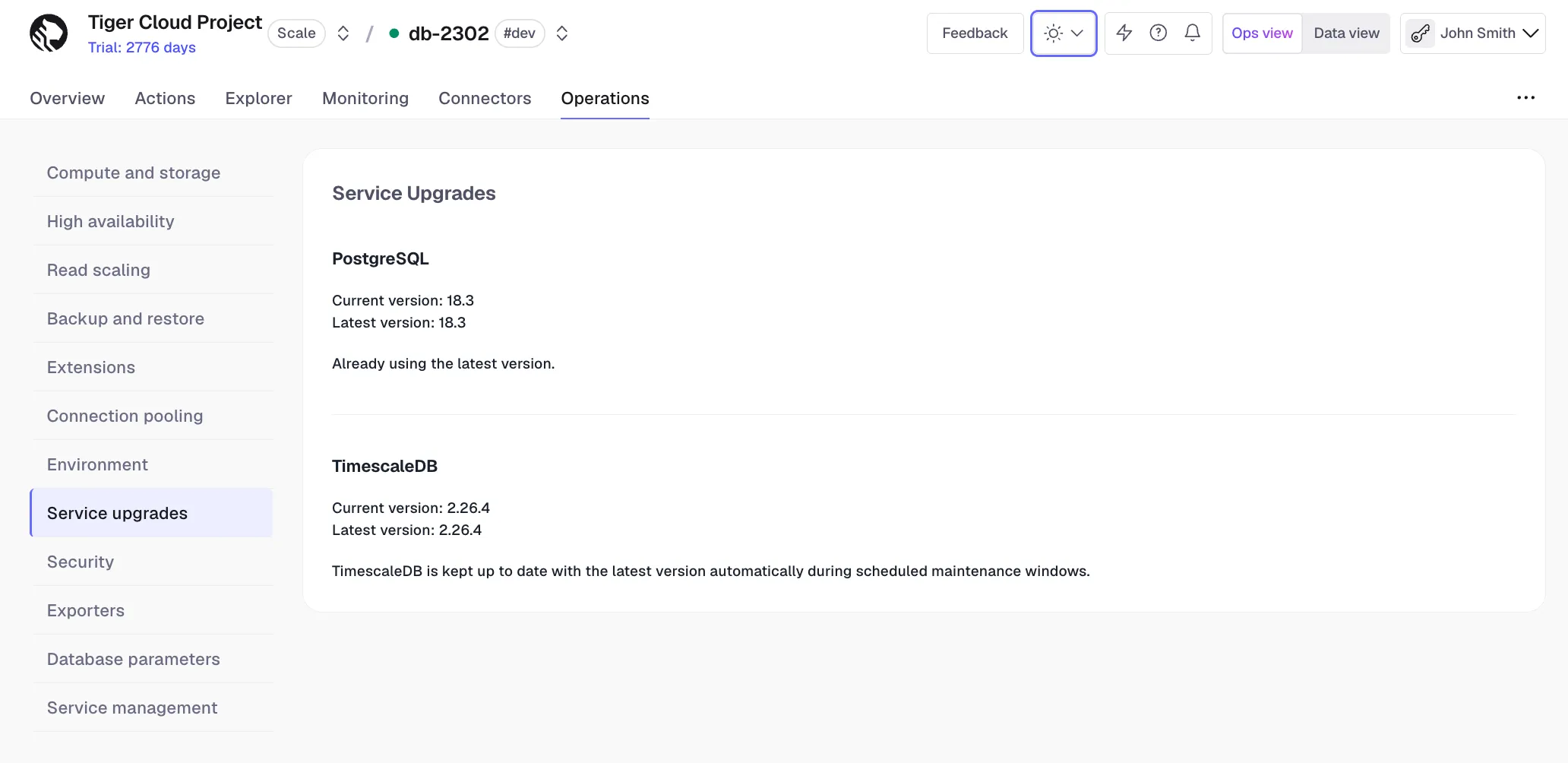
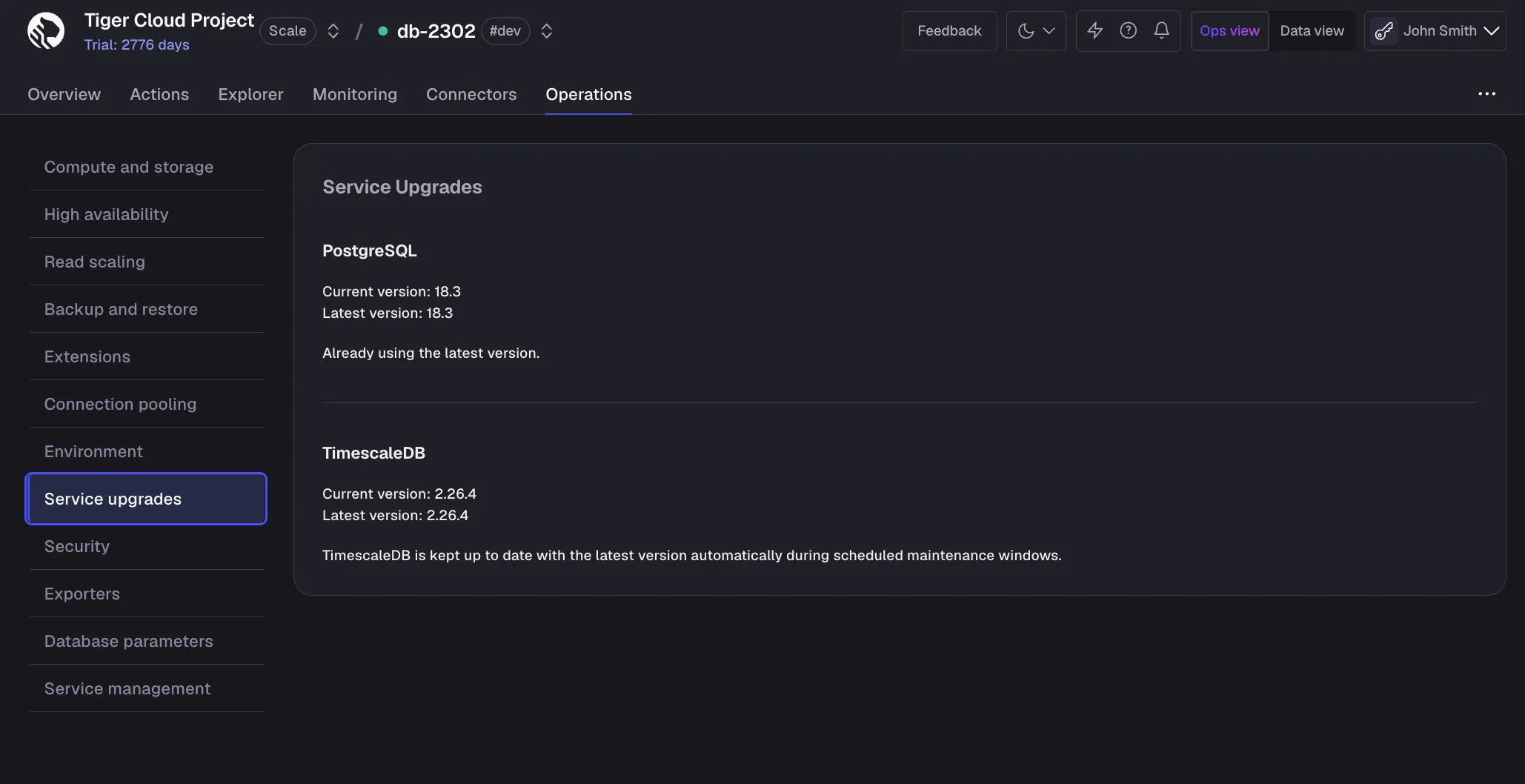
In Tiger Console, select your service, then click Operations > Service Upgrades. This shows your current TimescaleDB and PostgreSQL versions, and whether a newer version is available.
TimescaleDB upgrades
Tiger Cloud keeps your services on a supported version of TimescaleDB. Non-critical upgrades — new minor versions and patch releases — are applied during your maintenance window, or you can trigger them manually. Critical security patches are installed as soon as they are available.
Non-critical upgrades
Non-critical upgrades — including new minor versions and patch releases — are applied automatically in the next available maintenance window. The upgrade is first applied to your standard services tagged #dev, and three weeks later to those tagged #prod. Subscribe to get an email notification before your #prod services are upgraded. If there are no pending upgrades during a maintenance window, no changes are performed.
To apply a non-critical TimescaleDB upgrade manually before the next maintenance window:
- Connect to your service
In Tiger Console, select the service you want to upgrade.
- Upgrade TimescaleDB
Click
SQL Editorat the bottom, then runALTER EXTENSION timescaledb UPDATE.
Critical security patches
Critical security patches are installed outside your normal maintenance window as soon as they are available.
Downtime and connection resets
Most upgrades do not require any downtime. Connections and transactions in progress during the upgrade are reset, then the service connection is usually restored automatically. Some background maintenance tasks performed outside the maintenance window can also cause connection resets — when one occurs, you can immediately reconnect.
Some non-critical upgrades and critical security patches do require a short outage, usually between 30 seconds and 5 minutes. Tiger Data endeavors to notify you by email ahead of an upgrade that requires downtime. In some cases — particularly for critical security patches — advance notice is not possible. To track the status of maintenance events, see the Tiger Cloud status page.
To minimize the impact of downtime, schedule your maintenance window for a low-traffic period in your application, and add a high-availability replica or read replica. With a replica, writes pause only briefly during maintenance and read-only queries continue to be served by the replica throughout the upgrade.
During a maintenance event, each node is upgraded independently. The primary is upgraded and restarted first:
- If the primary restarts within a minute, no failover occurs. The replica stays as the replica, and maintenance then proceeds on it.
- If the primary takes longer than a minute to restart — and the replica has no replication lag — the replica is promoted to primary (one failover). Maintenance then proceeds on the demoted former primary. If that node is also slow to restart, the original primary is promoted back (a second failover).
Each failover takes less than a few seconds. In the worst case, two failovers add up to about two minutes of write downtime.
PostgreSQL upgrades
New minor versions of PostgreSQL are applied automatically during your maintenance window. You upgrade to a new major version of PostgreSQL manually, on your own schedule. Tiger Cloud only performs an automatic upgrade once your current PostgreSQL version reaches end-of-life.
Upgrading to a newer version of PostgreSQL allows you to take advantage of new features, enhancements, and security fixes. It also ensures that you are using a version of PostgreSQL that’s compatible with the newest version of TimescaleDB. For more information about feature changes between versions, see the Tiger Cloud release notes, supported systems, and the PostgreSQL release notes.
The following table shows you the compatible versions of PostgreSQL and TimescaleDB:
PostgreSQL 15 support is deprecated and will be removed from TimescaleDB in June 2026.
| TimescaleDB version | PostgreSQL 18 | PostgreSQL 17 | PostgreSQL 16 | PostgreSQL 15 | PostgreSQL 14 | PostgreSQL 13 | PostgreSQL 12 | PostgreSQL 11 | PostgreSQL 10 |
|---|---|---|---|---|---|---|---|---|---|
| 2.27.x | ✅ | ✅ | ✅ | ✅ | ❌ | ❌ | ❌ | ❌ | ❌ |
| 2.26.x | ✅ | ✅ | ✅ | ✅ | ❌ | ❌ | ❌ | ❌ | ❌ |
| 2.25.x | ✅ | ✅ | ✅ | ✅ | ❌ | ❌ | ❌ | ❌ | ❌ |
| 2.24.x | ✅ | ✅ | ✅ | ✅ | ❌ | ❌ | ❌ | ❌ | ❌ |
| 2.23.x | ✅ | ✅ | ✅ | ✅ | ❌ | ❌ | ❌ | ❌ | ❌ |
| 2.22.x | ❌ | ✅ | ✅ | ✅ | ❌ | ❌ | ❌ | ❌ | ❌ |
| 2.21.x | ❌ | ✅ | ✅ | ✅ | ❌ | ❌ | ❌ | ❌ | ❌ |
| 2.20.x | ❌ | ✅ | ✅ | ✅ | ❌ | ❌ | ❌ | ❌ | ❌ |
| 2.17 - 2.19 | ❌ | ✅ | ✅ | ✅ | ✅ | ❌ | ❌ | ❌ | ❌ |
| 2.16.x | ❌ | ❌ | ✅ | ✅ | ✅ | ❌ | ❌ | ❌ | ❌ |
| 2.13 - 2.15 | ❌ | ❌ | ✅ | ✅ | ✅ | ✅ | ❌ | ❌ | ❌ |
| 2.12.x | ❌ | ❌ | ❌ | ✅ | ✅ | ✅ | ❌ | ❌ | ❌ |
| 2.10.x | ❌ | ❌ | ❌ | ✅ | ✅ | ✅ | ✅ | ❌ | ❌ |
| 2.5 - 2.9 | ❌ | ❌ | ❌ | ❌ | ✅ | ✅ | ✅ | ❌ | ❌ |
| 2.4 | ❌ | ❌ | ❌ | ❌ | ❌ | ✅ | ✅ | ❌ | ❌ |
| 2.1 - 2.3 | ❌ | ❌ | ❌ | ❌ | ❌ | ✅ | ✅ | ✅ | ❌ |
| 2.0 | ❌ | ❌ | ❌ | ❌ | ❌ | ❌ | ✅ | ✅ | ❌ |
| 1.7 | ❌ | ❌ | ❌ | ❌ | ❌ | ❌ | ✅ | ✅ | ✅ |
We recommend not using TimescaleDB with PostgreSQL 17.1, 16.5, 15.9, 14.14, 13.17, 12.21.
These minor versions introduced a breaking binary interface change that,
once identified, was reverted in subsequent minor PostgreSQL versions 17.2, 16.6, 15.10, 14.15, 13.18, and 12.22.
When you build from source, best practice is to build with PostgreSQL 17.2, 16.6, etc and higher.
Users of Tiger Cloud and platform packages for Linux, Windows, MacOS,
Docker, and Kubernetes are unaffected.
Manually upgrade PostgreSQL
For a smooth upgrade experience, make sure you:
- Plan ahead: upgrades cause downtime, so ideally perform an upgrade during a low traffic time.
- Run a test upgrade: fork your service, then try out the upgrade on the fork before running it on your production system. This gives you a good idea of what happens during the upgrade, and how long it might take.
- Keep a copy of your service: if you’re worried about losing your data, fork your service without upgrading, and keep this duplicate of your service. To reduce cost, you can immediately pause this fork and only pay for storage until you are comfortable deleting it after the upgrade is complete.
Your Tiger Cloud service is unavailable until the upgrade is complete. This can take up to 20 minutes. Best practice is to test on a fork first, so you can estimate how long the upgrade will take.
To upgrade your service to a newer version of PostgreSQL:
- Connect to your service
In Tiger Console, select the service you want to upgrade.
- Disable high-availability replicas
- Click
Operations>High Availability, then clickChange configuaration. - Select
Non-production (No replica), then clickChange configuration.
- Click
- Disable read replicas
Click
Operations>Read scaling, then click the trash icon next to all replica sets. - Upgrade PostgreSQL
- Click
Operations>Service Upgrades. - Click
Upgrade service, then confirm that you are ready to start the upgrade.
Your Tiger Cloud service is unavailable until the upgrade is complete. This normally takes up to 20 minutes. However, it can take longer if you have a large or complex service.
When the upgrade is finished, your service automatically resumes normal operations. If the upgrade is unsuccessful, the service returns to the state it was in before you started the upgrade.
- Click
- Enable high-availability replicas and replace your read replicas
Automatic upgrades for deprecated versions
To ensure you benefit from the latest features, optimal performance, enhanced security, and full compatibility with TimescaleDB, Tiger Cloud supports a defined set of PostgreSQL major versions. As PostgreSQL and TimescaleDB evolve, Tiger Data periodically deprecates older PostgreSQL versions. If you do not upgrade before a deprecated version’s deadline, Tiger Cloud automatically upgrades your service to keep it on a supported PostgreSQL version. The automatic upgrade is applied during your maintenance window. Automatic upgrades can result in downtime, so best practice is to upgrade manually during a low-traffic period for your application.
Tiger Data provides advance notification to allow you ample time to plan and perform your upgrade. The deprecation timeline is as follows:
- Deprecation notice: you receive email notification of the deprecation and the timeline for the upgrade.
- Manual upgrade period: upgrade your service manually before the deadline.
- Automatic upgrade deadline: Tiger Cloud performs an automatic upgrade of your service.
During an automatic upgrade:
- Any configured high-availability replicas or read replicas are temporarily removed.
- The primary service is upgraded.
- High-availability replicas and read replicas are added back to the service.
Define your maintenance window
When you are considering your maintenance window schedule, best practice is to choose a day and time that usually has very low activity, such as during the early hours of the morning, or over the weekend. This helps minimize the impact of a short service interruption. Alternatively, you might prefer to have your maintenance window occur during office hours, so that you can monitor your system during the upgrade.
To change your maintenance window:
- Connect to your service
In Tiger Console, select the service you want to manage.
- Set your maintenance window
-
Click
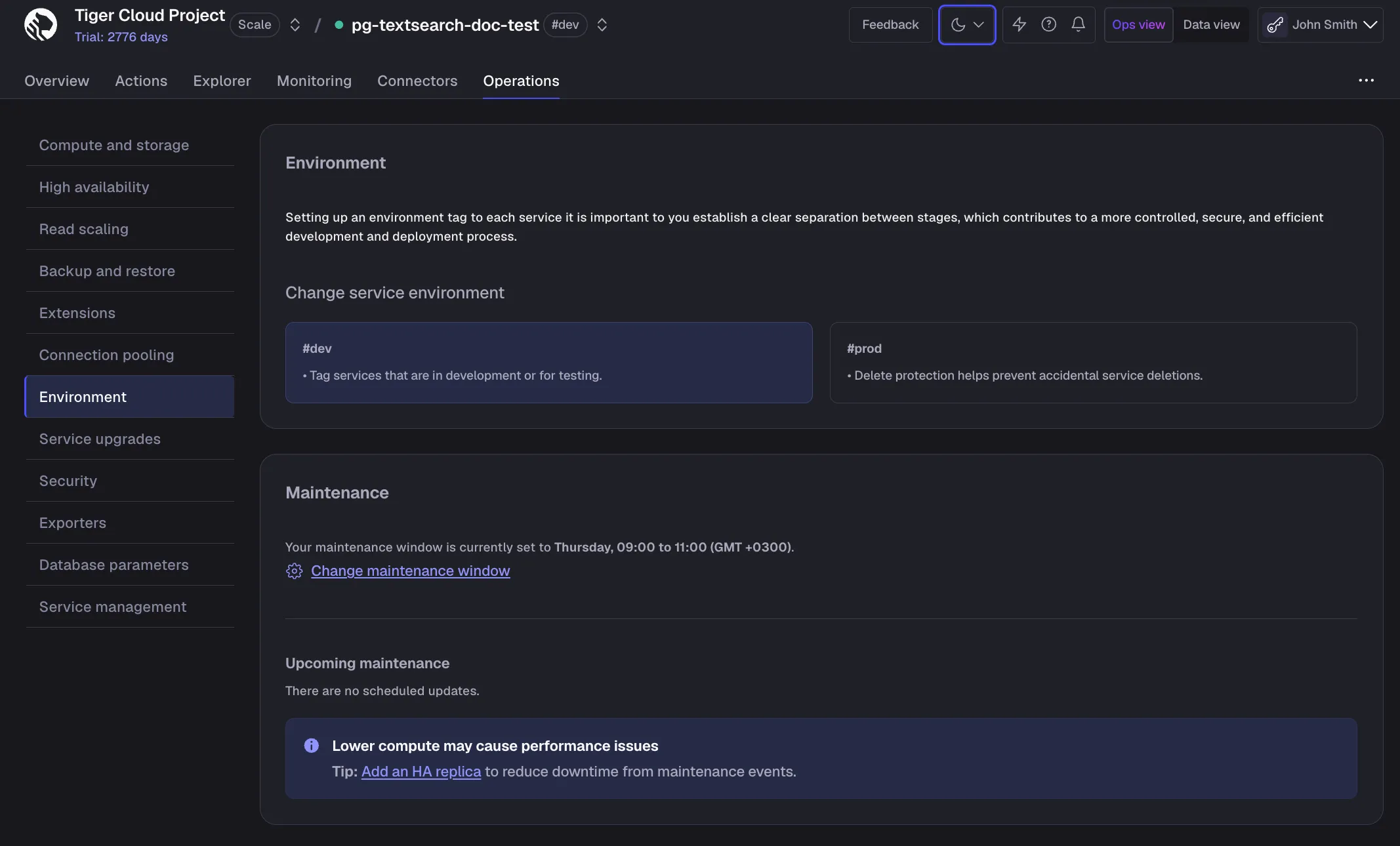
Operations>Environment, then clickChange maintenance window.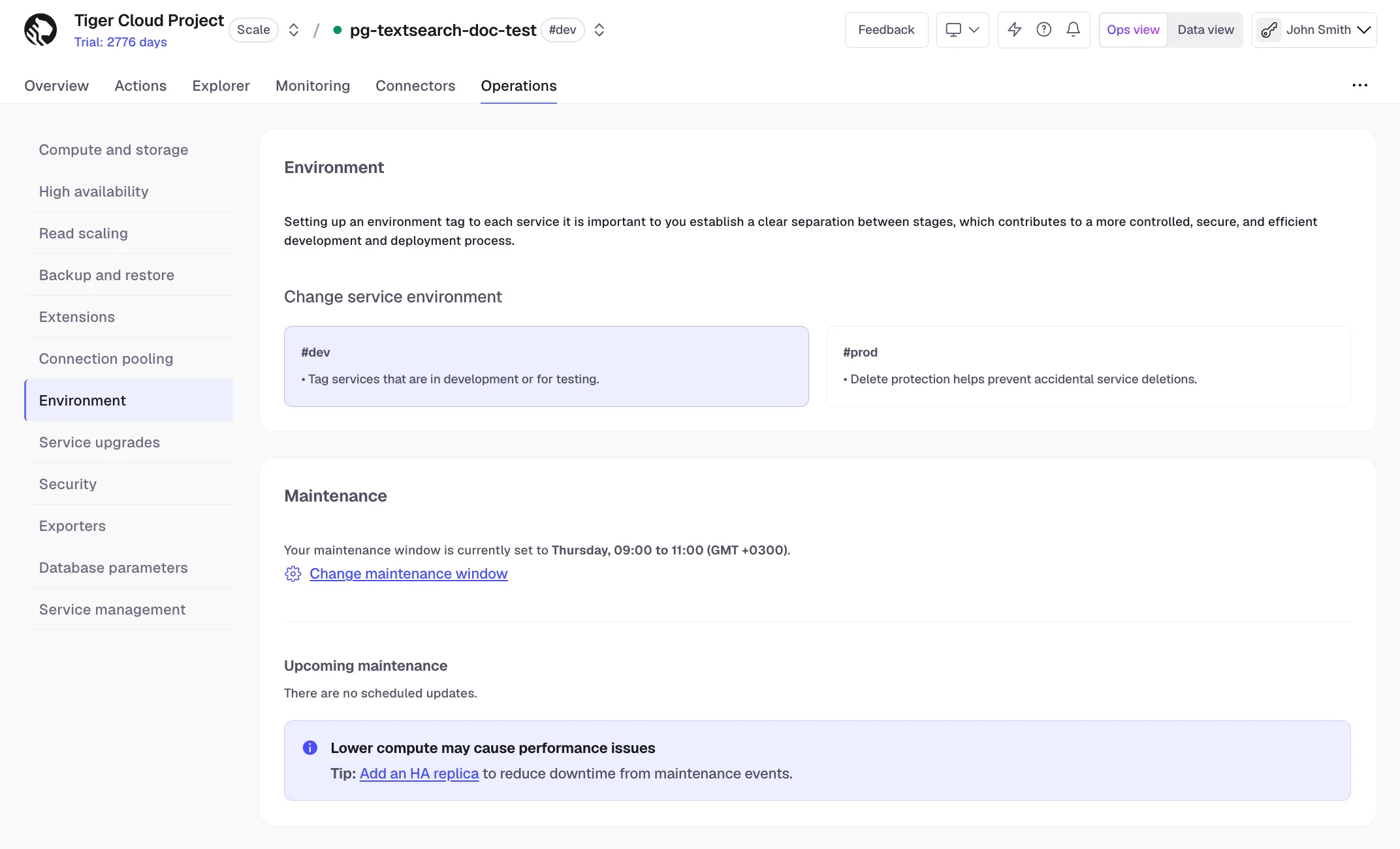
-
Select the maintenance window start time, then click
Apply.
Maintenance windows can run for up to four hours.
-